Alden in your browser
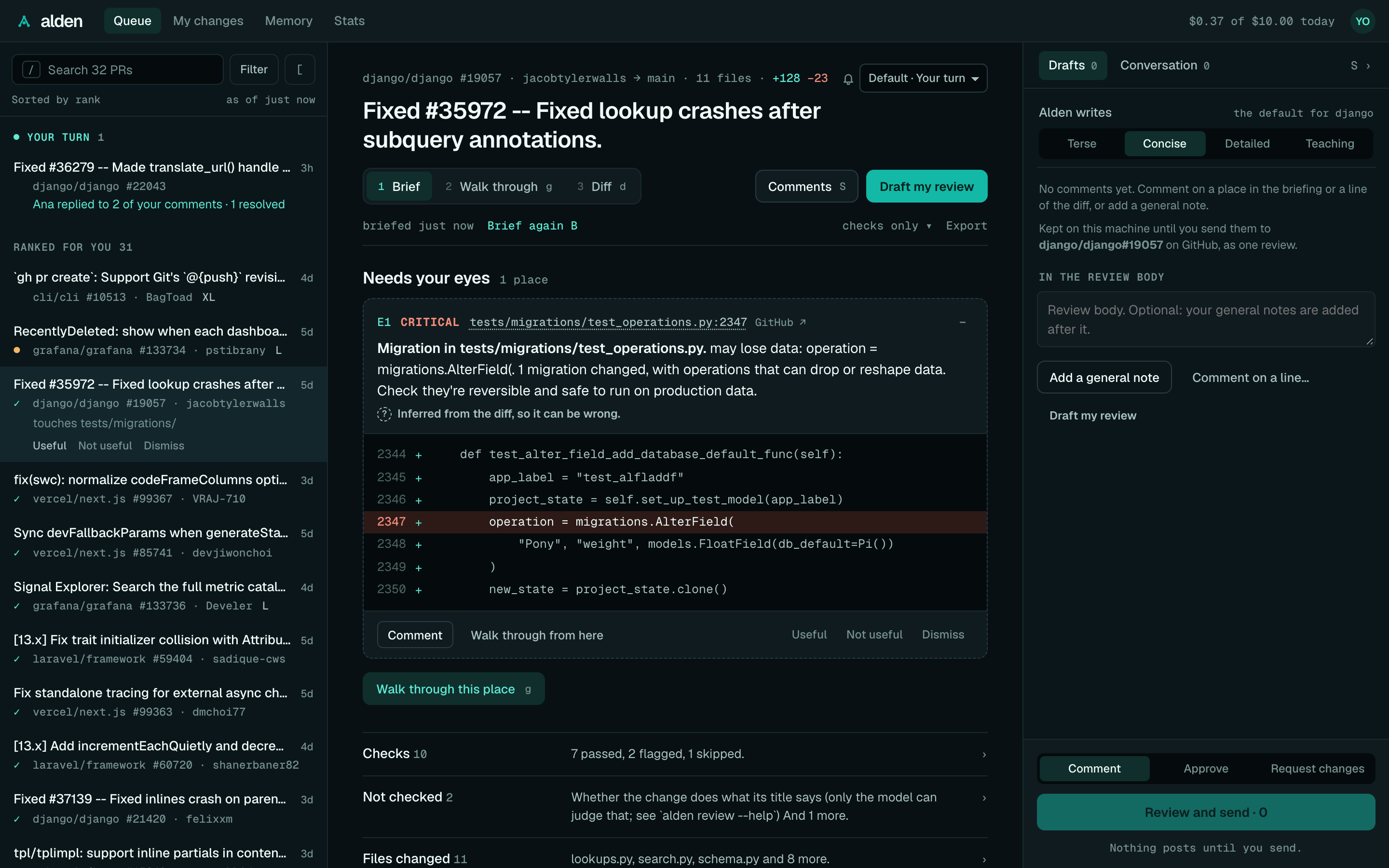
alden ui opens your review queue in the browser: the PRs waiting on you, a briefing on each, the PR's diff, and the
comments you're writing, which you send to GitHub as one review. It shows the same briefings as the CLI, from the
same engine, and runs on your machine like the rest of Alden. The desktop app shows this same UI in a
window.
Start it
cd ~/code/shop        # a clone of a repo you review
alden ui
Alden opens the page in your browser. Run it from a clone of a repo you review, as with alden review: Alden finds
callers there, and My changes reviews that clone's uncommitted changes. PR briefings also find callers in other
clones Alden knows (see Configuration).
| Flag | What it does |
|---|---|
--port <n> |
Serve on this port instead of a free one. |
--no-open |
Print the link instead of opening a browser. |
--json |
Print one JSON line with the link and port, and don't open a browser. The desktop app uses it, and it turns on background briefings. |
Stop it with Ctrl+C. The link holds a session key, so open Alden from the link it prints; a new run makes a new one.
The layout
- The top bar has the views: Queue, My changes, Memory and Stats, and on the right today's model
spend against your daily cap ("$1.84 of $5.00 today") and your avatar (your initials). The avatar's menu has
Settings, Export feedback (a JSON file of your feedback, as Settings exports it; the desktop app saves it to
Downloads) and Sign out, which removes the GitHub sign-in Alden stored, as
alden auth logoutdoes. When the GitHub CLI's sign-in orALDEN_GITHUB_TOKENstill signs you in, it says so: Alden leaves those alone. - The queue is on the left: the PRs waiting on you, ranked.
- The PR pane is in the middle. Pick a PR and its briefing shows here. Once it's briefed, three numbered steps
read it in order: 1 Brief, 2 Walk through (
g) and 3 Diff (d). - The Comments drawer is on the right. It collects the comments you write on this PR, and sends them.
Below 960px wide, the queue and the PR take turns: pick a PR to open it, and ← Queue or Esc goes back. At 700px
and narrower, the Comments drawer is a full-width sheet over the briefing.
The UI follows your system's light or dark appearance unless Settings picks one. Its fonts (Geist and Geist Mono) are served by Alden itself, under the SIL Open Font License.
Signing in
With no GitHub sign-in at all, the page opens on the first run: sign in, choose how Alden thinks, then your queue, one screen each (see First run; Skip setup leaves it, Settings → Run setup again brings it back). If GitHub no longer accepts Alden's sign-in, or you skipped the first run, the queue says so and offers:
- Sign in with GitHub: a one-time code, with GitHub's page opened for you. Alden picks up your approval by itself.
- Use my GitHub CLI sign-in, when the GitHub CLI (
gh) is signed in.
If you signed in in a terminal instead (alden auth login), I've signed in looks again. If Alden still can't see
a sign-in, it says why: the keychain refused to answer (as it does for an unsigned development build of the desktop
app), GitHub rejected the token, or there's no sign-in anywhere.
The queue
The queue has two groups: Ranked for you, and Fast-track, small low-risk PRs you can clear quickly. Above them, Your turn (in teal) lists the PRs you reviewed where something happened you haven't seen, when there are any (see below). Each row is two lines, so a long queue scans quickly:
- the title, and how long it has waited on you ("5h", "3d");
- a mono line: CI (✓ passing, ✕ failing, ● running, ⊘ cancelled, nothing without CI), "repo #number · author", and plain flags: re-review (asked again since you reviewed), ✎ 2 (comments you haven't sent), L or XL (400 or 1,000 changed lines and up), draft, agent or bot (as Bots and AI agents tells them apart), ping @author (CI failing, so it's on them) and ✓ briefed (a briefing the desktop app prepared).
The selected row also says why it ranks where it does. A reason marked ↑ or ↓ comes from your own feedback, and "↑ your rule: payments/ first" from a rule you set (see Ranking). On a PR you reviewed before, it says when ("Reviewed 2 days ago"), and once something has happened to your comments, it counts it ("3 of your 5 comments resolved"). See The review queue for how ranking works, and Re-reviews.
Your turn. A PR you reviewed that isn't in your queue, where someone answered you since, shows at the top: its title, what happened ("Ana replied to 2 of your comments · 1 resolved"), and when ("3h ago"). Click it to open the PR, with the Comments drawer's Conversation open on the thread the news is in; it stays in the list while it's open, and leaves once you move on. A PR that's in your queue (a re-review always is) gets the news on its own row instead, in teal under it, the same way. Search and filters don't hide Your turn; your queue's scope does. It follows each PR's follow-up level (Off hides it) and shares what you've seen with the desktop app's notifications. See Your turn for what counts, and what it asks of GitHub.
Under the search, a line says how the queue is sorted ("Sorted by rank") and how old it is. When you open the page,
the last queue shows at once (up to a day old), "as of 3 min ago, refreshing…" until the current one arrives. r, or
a click on "as of …", fetches it again. A PR you've opened shows ✎ 2 while it has comments waiting to be sent.
The first time, a card at the top asks whether to send anonymous usage stats. Your answer is kept, and Settings changes it.
Search, filters and sort
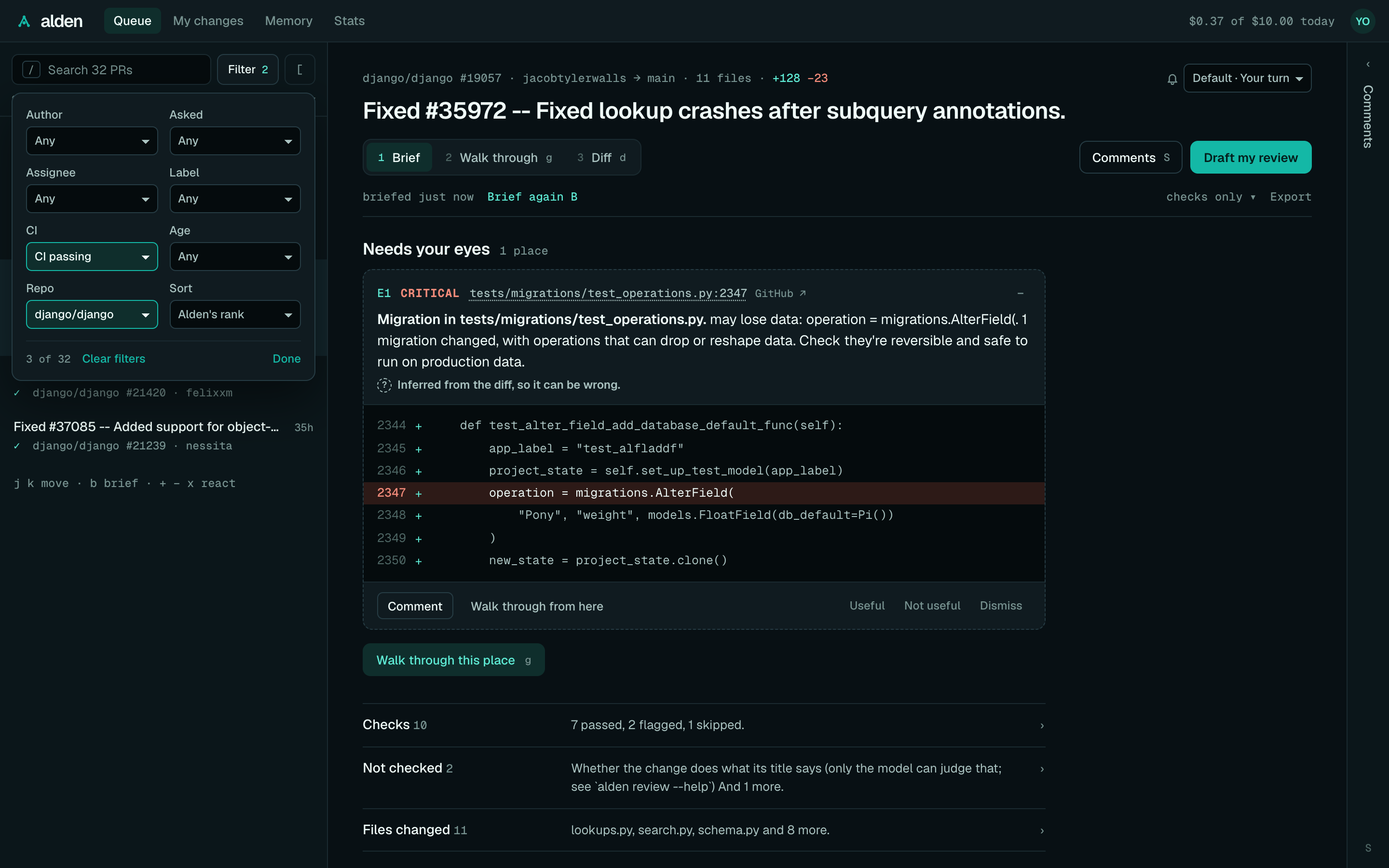
Alden fetches your whole queue (up to the 1,000 PRs a GitHub search returns), so search and filters cover all of it.
- Search (
/, "Search 142 PRs") matches the title, repo,#number, author and branch names. Every word has to match, and@sammeans the author sam.Enteropens the first match;Escclears the search and goes back to the list. - Filter, beside the search, opens every filter in one popover: author (you, people, bots or AI agents, as
Bots and AI agents tells them apart), how you were asked (you directly, your
teams, or one team), assignee (you, unassigned, or someone), label, drafts (hide them, or only drafts; shown when the queue has any), CI
(passing, failing, running, none; cancelled CI is none of the first three), age (opened today, this week, or
before) and repo. They combine. A filter that's on is highlighted with its value, the button says how many are on
("Filter 2"), and the line under the search says "3 of 33" with Clear filters.
Escor Done closes it. - Sort, in the same popover: Alden's rank (the default), open longest, waiting longest on you, recently updated, or smallest first for quick wins. It sorts inside each group, and dismissed PRs stay at the bottom. Each row then says where Alden ranks it ("rank 3").
j and k (or ↓ and ↑) move through the queue as it's shown, opening each PR. Filters and sort are remembered in
this browser until you reset them; the search isn't.
Collapse the queue
[, or the [ button beside Filter, folds the queue into a thin rail, so the PR takes the full width. [ again, or a
click on the rail, brings it back. / and j/k still work while it's folded, and the fold is remembered like the
filters. Below 960px wide there's nothing to fold.
React to a PR
The selected row has Useful, Not useful and Dismiss (or +, − and x), in plain words under it. Useful and not useful teach
Alden which PRs like it to rank higher or lower ("ranked lower: you usually skip Dependabot PRs"). Dismiss moves
a PR to the bottom until it changes; dismiss it again to undo. Briefing a PR from the queue counts as opening it,
which teaches Alden too. See The review queue and Learning and memory.
A briefing
Over the briefing, the PR's header has a mono line ("acme/api #482 · ana → main · 6 files · +214 −38"; the repo
and number open it on GitHub, and the bell beside it sets its notifications), the title, the reading steps with
Comments (s) and Draft my review, and the age line: when it was briefed, Brief again, the model line
and Export.
Pick a PR, then Brief me (or b). Alden fetches the PR, finds the callers of the code it changes, runs its checks
and asks the model, showing each stage as it goes. Esc stops it. A briefing keeps running if you look at another PR,
and it's there when you come back.
The briefing reads in one direction: what the PR does, the few places to look, then everything else folded away. See Briefings and checks for what's in it.
- What it does, when the model was asked: one paragraph, and whether it matches its title ("✓ matches its title", "partly matches its title", "✕ doesn't match its title").
- Needs your eyes · 3 places: the places to look first (3 unless you change it in Settings), as cards numbered
E1, E2… with how severe each is, its
file:lineand why it's there. The first is open. An open card shows the code at the place with its line picked out, then Comment (the Comments drawer's editor at that place), Walk through from here (the walk-through at that step), and Useful, Not useful and Dismiss with what your reaction taught Alden.+and−open and close a card. A place'sfile:lineopens the Diff at that line; GitHub ↗ beside it opens the PR's "Files changed" on GitHub. - Walk through these 3 places (or
g) starts the walk-through. - Four rows, each with a count and a line, that open to the whole section:
- The model also noticed: its other findings, with Comment and "Draft ready" when Alden drafted a comment. The row's line says when one is "Because of your note on …" and when a draft is ready. When there are no drafts, the reason ("No drafts: …") is under the findings and in the footer.
- Checks: every check Alden ran, with its evidence ("7 passed, 1 flagged, 2 skipped. … quietened for this repo."). Flagged checks start open. Places hidden by your feedback are listed here too.
- Not checked: what Alden couldn't check.
- Files changed: every file with its
+and−counts.
Each place, finding and flagged check has Useful and Not useful, which teach Alden what you look for, and Dismiss, which hides one place on this PR. A model finding raised because of one of your notes says "Because of your note: …". Useful on it confirms the note; after Not useful, it offers Stop applying this note to app/api? (Stop applying, then Undo) and Edit the note, and without either nothing changes. See Findings from your notes. You missed something tells Alden what it should have flagged. One line under the rows, "Shaped by your feedback: …", says what your feedback changed in this briefing, with What Alden knows.
Tune: model, tone, effort, callers and cap
The model line on the age line ("sonnet-5 · medium ▾", or "checks only") opens Tune this briefing:
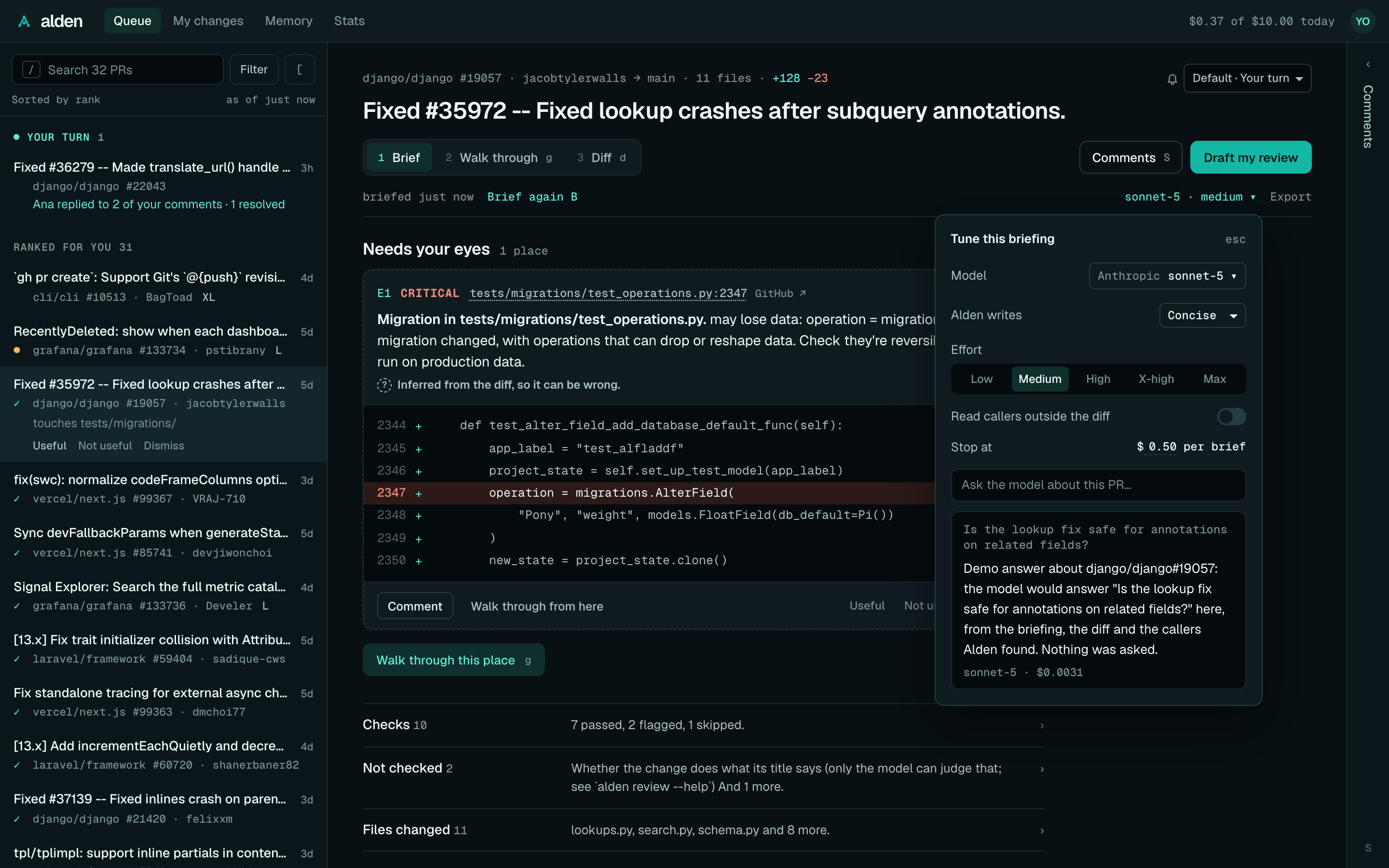
- Model: the models Alden can use, by provider (Anthropic, OpenAI, Local), with how it reaches each ("your key", "Ollama") and a word on what each is good for. A provider without a key can't be picked; Add a key sets one up. Picking a model saves it as the one briefings use. Checks only briefs without the model, for this window.
- Alden writes: how Alden words the comments it drafts in this repo (terse, concise, detailed or teaching).
- Effort: Low, Medium, High, X-high or Max, for models that take it. More effort, more time and cost.
- Read callers outside the diff: whether to find the callers of the changed code.
- Stop at $0.50 per brief: the per-briefing cap, saved to your config (
budget.perReviewUsd). - Ask the model about this PR…: a question, answered in the popover as it streams in, with the model and what it cost under it. Without a model set up, it says so instead.
Effort and callers last until you close the tab; Settings changes the defaults. Esc closes the popover.
Above the briefing, Alden says which clone the callers come from, when it isn't the folder alden ui runs in. With no
clone of the PR's repo, it says so, and how to point Alden at your clones (alden config set clones.folders ~/src).
Set up a model
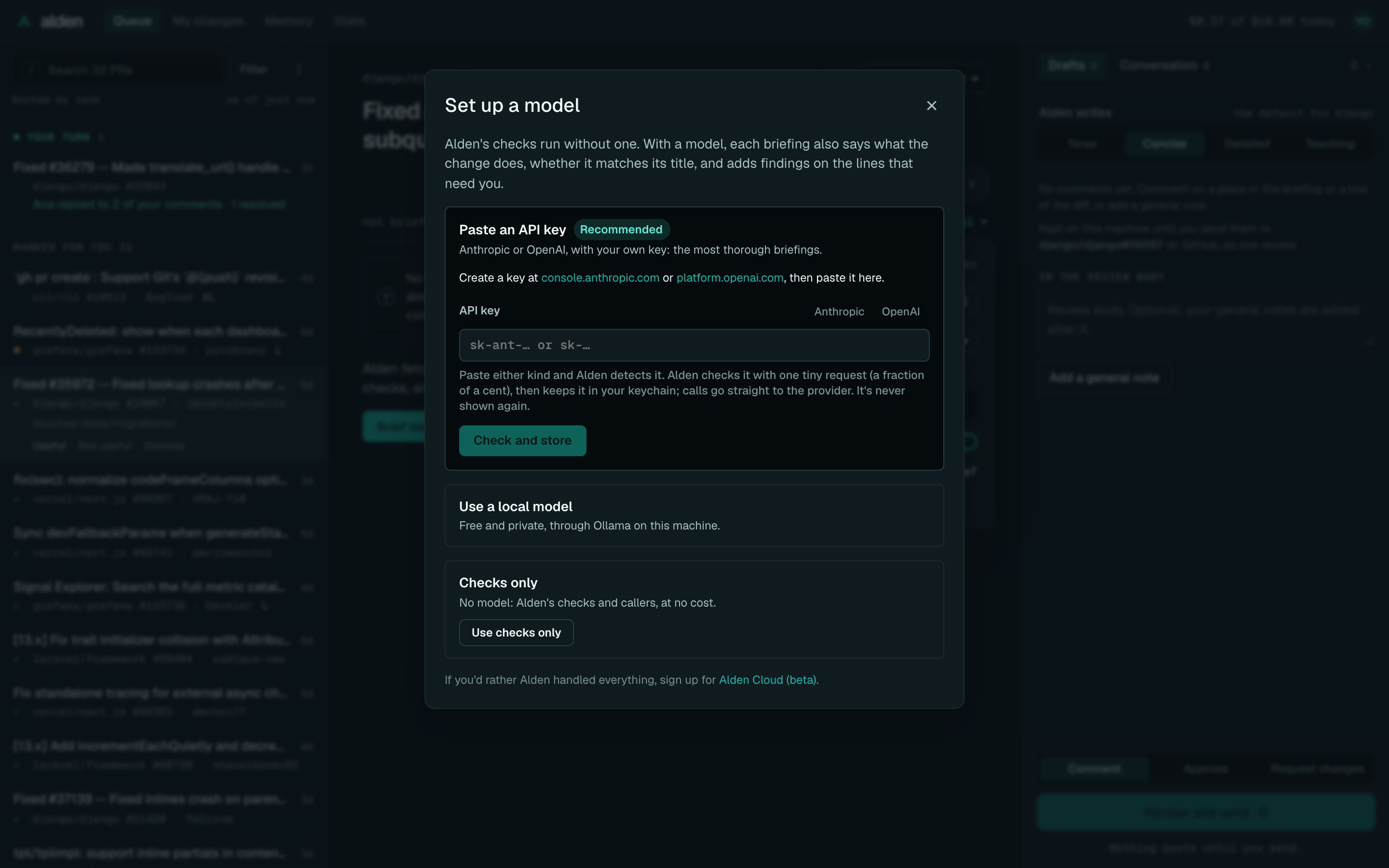
With no model set up, the model line says "no model" and Tune offers Set up a model (or Add a key in the
model list). It has the same three choices as
alden setup, in the same order:
- Paste an API key, Anthropic's or OpenAI's: Alden detects which as you paste (sk-ant-… is Anthropic's, any other sk-… OpenAI's). It checks the key with one tiny request to its provider, which costs a fraction of a cent, then keeps it in your keychain and makes that provider the model. The page never gets it back.
- Use a local model through Ollama. Alden recommends one for your machine's memory and downloads it, with progress, if Ollama doesn't have it. Local models flag less than Claude.
- Checks only.
Below them is a link to Alden Cloud (beta). The next briefing uses the new model, with no restart. See Models, providers and budgets.
When it was briefed, and Brief again
The age line says when the briefing was made ("briefed 30m ago"), then Brief again (b). Once the PR or its base
has moved on, it says what changed, in amber: "main +4 commits" (callers merged there since aren't in it) or "PR +2
commits"; hovering says it in full. Alden asks GitHub, one request, when the briefing is shown and when the window comes back to
the front, at most once a minute. It doesn't poll. See
Keeping up with the base.
Export
Export (or e), at the end of the age line, copies, saves or prints the briefing:
- Copy as Markdown puts the same document as
alden review --markdownon the clipboard. - Save as Markdown downloads it as
owner-repo-123-briefing.md. - Print / Save as PDF opens the print dialog, where your system offers PDF. The printout is the briefing alone, in light colours, with places and checks kept whole across pages.
The Markdown leaves out your memory notes and what your feedback changed, keeps secrets masked as the briefing shows them, and ends with the model, its cost and when it was briefed. A line beside the button says what happened ("Copied as Markdown.").
The Diff tab
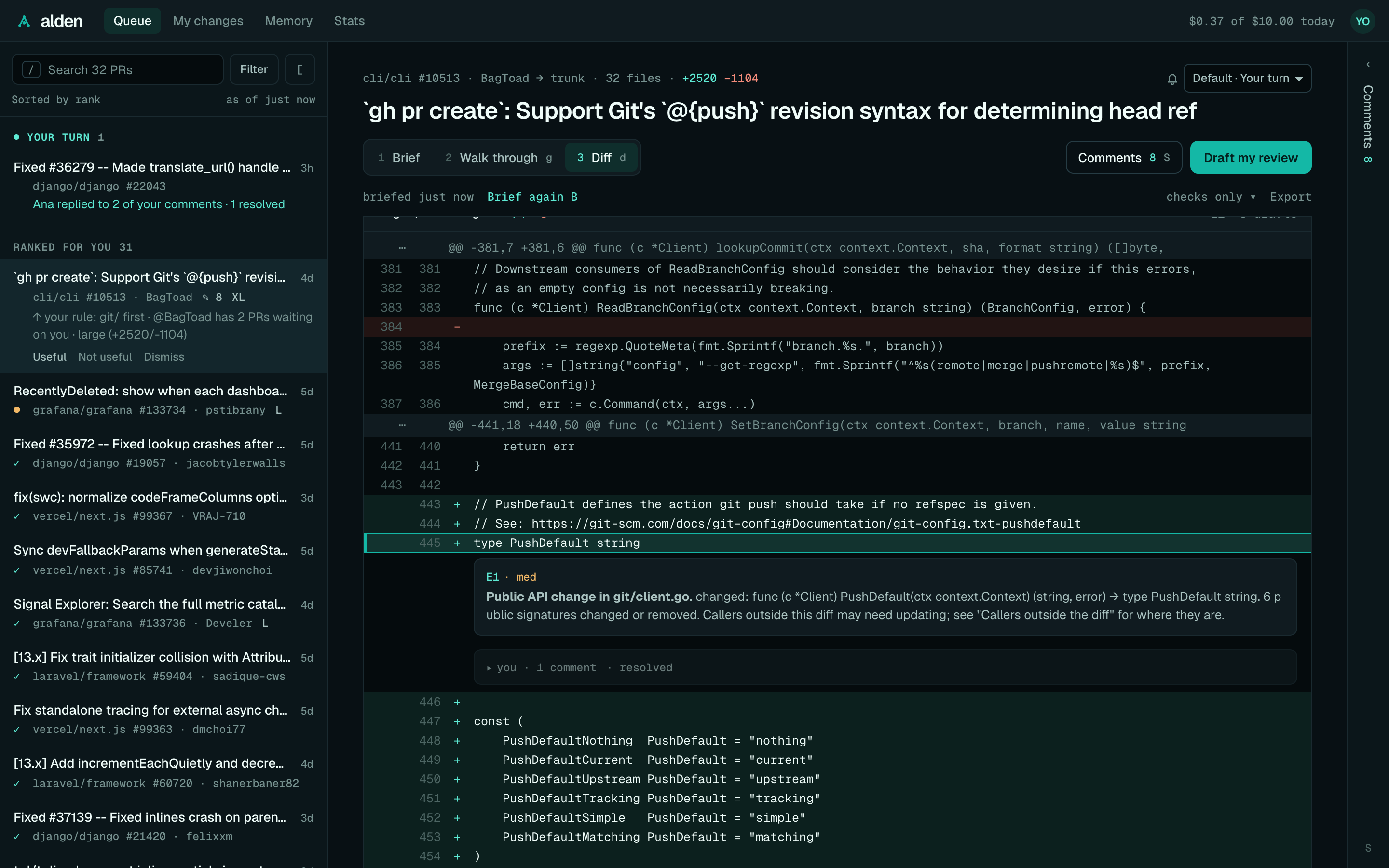
Once a PR is briefed, 3 Diff (or d) shows the code itself, so you don't have to go to GitHub to read it.
- Every changed file, with its
+and−counts, "old → new" for a rename, and a note for a binary file or one too large for GitHub to send (with a link to it on GitHub). - Lines are unified, with the old and new line numbers. Each file opens and closes from its header, or
f; Collapse all folds them all. - Above the files, "file 2 of 6" says which file you're reading.
- Each file's header has its path, its
+and−counts, and what's marked in it: "E1 · 1 draft". - Lines show their old and new numbers and a
+or−. Alden's places to look sit under their lines as cards, "E1 · high" and why (a place on a whole file is named in its header); click the label to fold one.]and[go to the next and previous place. - Your comments sit under their lines too, each saying who it's from first: "you · draft", "Claude Code · outdated", and Alden's drafts you haven't kept dashed, "Alden · suggested".
- On a PR, + beside a line starts a comment on it in the Comments drawer. Shift-click a second line, or drag, for a range on the same side of one hunk.
- On a PR, the review threads already on it show under their lines: who's in each and how many comments, open unless resolved. Reply opens that thread's Reply box in the Comments drawer. See Replying in a thread.
A place's card that's been on screen for 1.5 seconds counts as a place you saw, which Alden learns from when you send your review: see Places you saw.
For a PR, the diff is the PR's latest push. If that's newer than the briefing, a line above the diff says so, since places may have moved. For My changes, it's your uncommitted changes, as the briefing read them.
Since your review
On a PR you reviewed before, the Diff tab has Whole PR | Since your review above the files, and opens on Since your review: only what changed from the commit you last reviewed to the PR's head, so a second look starts where your first one stopped. Whole PR shows everything.
- Places to look and your comments still show at their lines when the narrower diff has them. The old side is the commit you reviewed rather than the PR's base, so comments on removed lines show, and are written, in Whole PR.
- If the commit you reviewed isn't in the PR's history any more (a force-push or rebase), the tab shows the whole PR and says so. If nothing has been pushed since, it says that instead.
- If the author merged the base branch in since your review, its changes are part of "since" too.
- It's one GitHub request (the compare API, which lists up to 300 files), kept like the whole diff while
alden uiruns.
Large diffs stay quick: rows render as you scroll to them, and files over 400 lines of diff start collapsed, with
Show. Alden keeps a PR's diff per push while alden ui runs, so opening it again is instant. The tab you were on
is remembered until you close the window.
Walk through
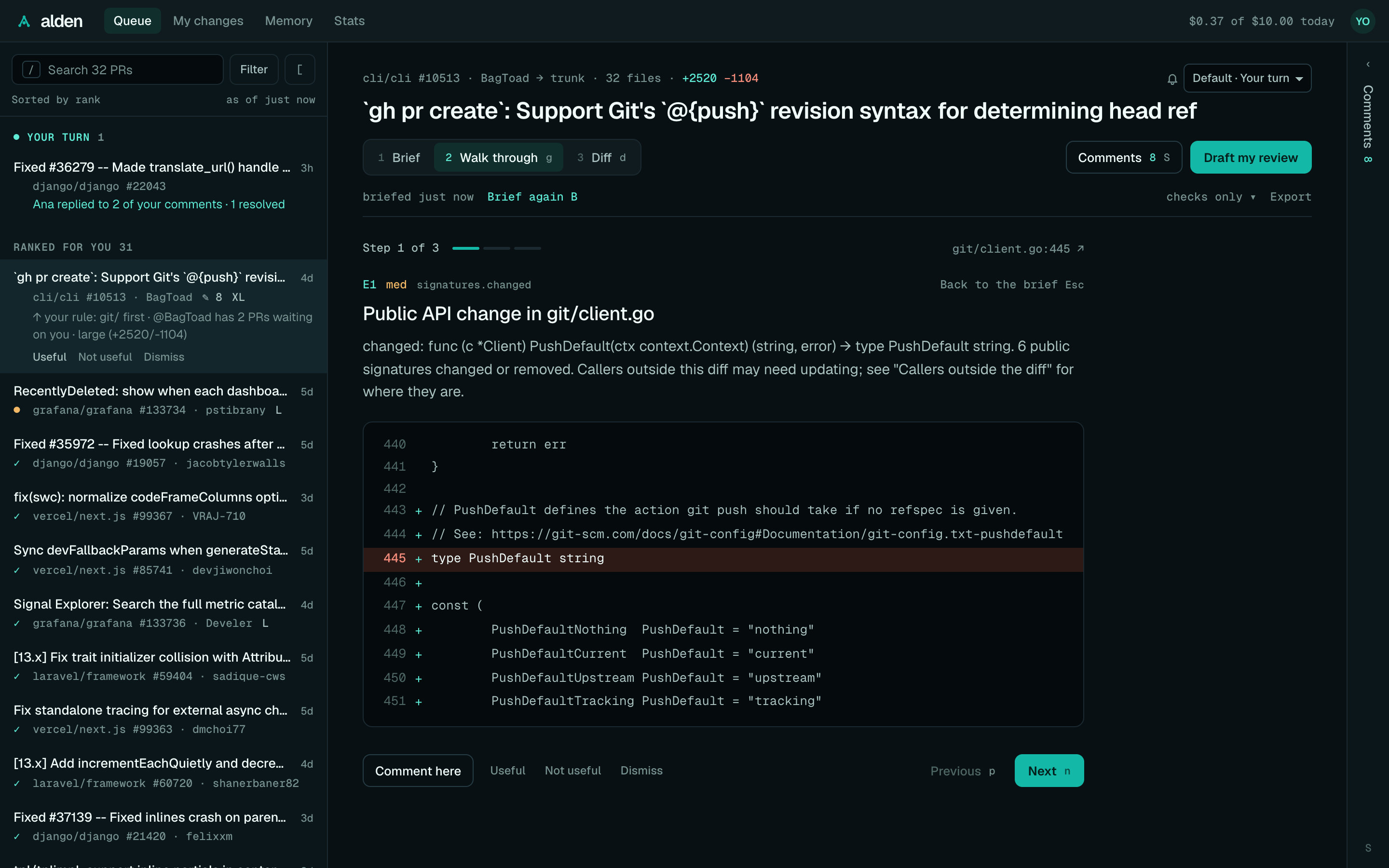
When a briefing has places that need your eyes, 2 Walk through in the PR's header, Walk through these 3 places, or g (from the Diff too) takes them one at a time, in
Alden's order, in place of the brief. Walk through from here on a place's card starts at that place. Each step
shows:
- "Step 2 of 4" with a dot for each step, and the place's
file:line(a link to it on GitHub at the PR's head). - Its number and how severe it is ("E2 · high"), the check, its title, and why it's there.
- The code at that place, a few lines either side, from the PR's diff, with its line picked out.
- Look at these too: the files worth opening beside it, from the code graph, one row each with what it is (caller, test, imports it) and where. A file in the diff opens its lines in place; the rest link to the file on GitHub at the PR's head.
- Comment here, which opens the Comments drawer's editor at that place, and Useful, Not useful and Dismiss, as in the brief.
After Alden's places, the model's other findings that point at code follow as extra steps, with Comment here too. A step from one of your notes says "Because of your note: …" and has the same offer after Not useful.
Previous (p) and Next (n) move between steps. Esc, or Back to the brief, goes back, and Resume the
walk-through at step 3 takes you back there while the window is open. The last step offers Finish: review your
comments, which opens the drawer at the review body. For My changes, the walk-through shows the places and their
files to look at, without the code.
On a PR, a step that's been in front of you for 1.5 seconds counts as a place you saw, which Alden learns from when you send your review: see Places you saw. Nothing about it leaves your machine.
Comments and sending a review
You write your review in Alden, beside the briefing, and send it to GitHub as one review. Nothing posts until you send it. See Comments and sending a review for the same from the terminal.
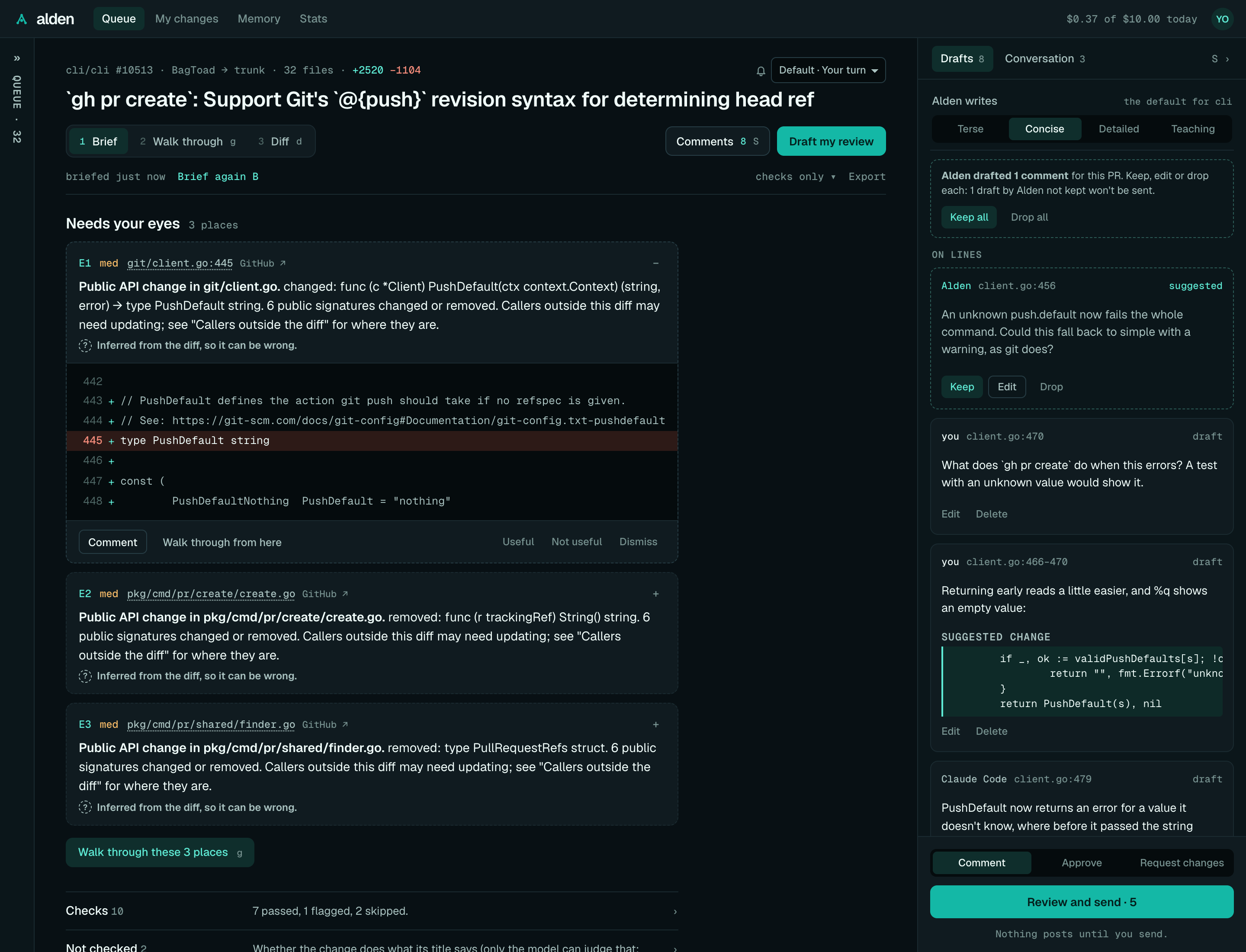
The Comments drawer
Comments 3 (or s) in the PR's header opens and closes the drawer. Its header has two tabs, Drafts and
Conversation, each with its count.
Drafts starts with Alden writes: the style Alden drafts in for this repo, Terse, Concise (the default), Detailed or Teaching, saved for the repo (shown when your Alden has it). Then your drafts, as cards, by where they'll post:
- On lines: each card's first line, in small type, says who wrote it (you, Alden or Claude Code), where it goes ("pricing.py:4", or "pricing.py:4–9" for a range; hover for the whole path) and, on the right, its state: draft, suggested, kept or outdated. Then its text (the first four lines, with Show all) and any suggested change, with Edit and Delete.
- In the review body: the review body, then your general notes, which follow it. A linked note says "links to tasks.py:5"; hovering it names the file, line and the commit its link shows, the PR's head when you wrote it.
- Replies in threads: where each reply goes, "Reply in thread on src/pay.ts:40, and resolve it".
Then Add a general note, Comment on a line… and Draft my review. With nothing drafted yet, it says where your comments will go: "Kept on this machine until you send them to acme/shop#412 on GitHub, as one review."
Conversation has the PR's review threads, yours first and open ones first, each a card saying where it is and whether it's yours, its state (replied 2h ago, open, outdated or resolved), each comment with who wrote it in bold, and Reply and, on a thread you started, Resolve when sent (someone else's says "ana's to resolve"). A reply or a resolve is a draft like any other, sent with your review (see Replying in a thread).
At the bottom, always in view, are the verdict (Comment, Approve or Request changes), Review and send · 3 and "Nothing posts until you send."
The drawer stays open or closed as you left it in this window, and starts open when the window is wide enough for it
beside the queue. S ›, s or Esc folds it to a narrow rail on the window's edge saying "Comments 3"; click the
rail or press s to open it again. Drag its left edge to resize it, from 320 to 760 pixels (Alden remembers the width
on this machine; arrow keys work on the edge too), and double-click the edge to put it back to 380. In a narrow window
it's a full-width sheet instead, with no rail.
Write a comment
There's one editor, always in the drawer. It opens from:
- Comment on a place in "Needs your eyes", on a flagged check's evidence line, on something the model also
noticed, or on a step of the walk-through.
cdoes the same for the place you're on. - + beside a line in the Diff tab, or a range picked there.
- Comment on a line… in the drawer: pick a changed file and give a line (
12) or a range (4–9). A removed file's line is on the old side. - Add a general note, for the review body.
The editor names exactly where the comment goes: "Comment on py/orders/pricing.py, line 4", or "lines 4–9" for a
range. ⌘↵ (Ctrl+↵) saves; Esc cancels and puts focus back where you were. The place keeps a short list of your
drafts on it.
- Suggest a change (lines on the new side only) adds a code box, started from the line's text when Alden has it. It posts as a suggested change the author can accept on GitHub. Left empty, it suggests deleting the lines. A suggestion needs no words of its own.
- On code outside the diff. GitHub only takes inline comments on lines in the PR's diff. On any other line (a caller in an unchanged file, say), the editor says so before you save: "This line isn't in the PR's diff, so it goes in the review body with a link to it." It's saved as a linked note, which starts with a link to that line at the PR's head. A place or finding about a whole file gets one too, linking to the file. A suggestion in a linked note posts as code headed "Suggested change", for the author to copy.
In the Diff tab, a linked note shows at its line, or on its file, when the diff has it.
Claude's drafts, and outdated drafts
Drafts that Claude Code added (through the plugin or alden mcp) start with Claude Code, so you
read them before they go out under your name. Claude can draft comments, but never send them.
Drafts Alden made from its model's findings start with Alden and say suggested, with a dashed border and Keep, Edit and Drop, and Keep all / Drop all at the top of the drawer. Until you keep or edit one, it isn't sent: the drawer says how many won't be, and Review and send counts only what will post. Kept, it looks like yours and says kept; dropped, it stays dimmed where it was until you open another PR. The briefing marks a finding with one Draft ready. See Alden's drafts.
Drafting with Alden
With a model set up, Draft my review (beside Comments, and in the drawer once the PR is briefed) asks the model, in one call within your caps, to draft comments for the places to look and the model's findings that have no comment near them yet. While it runs it says "Drafting…"; then it opens the drawer on the new drafts and says how many it made, what the call cost and how many places it skipped, or why it couldn't. Without a model, the drawer offers Set up a model instead.
Each comment and reply box has Draft with Alden: it fills an empty box with the model's text for you to edit (Undo empties it), or, when you've written something, shows Alden's version of it with Use it and Keep mine. Cancel stops it while it's drafting. It saves nothing: you save, and the comment is yours.
Both write in the repo's tone (Terse, Concise, Detailed or Teaching: a style you pick for Alden's
drafts, not an imitation of you), set per repo on this machine or for every repo (drafts.tone); either can take a
different tone for one draft. See The tone Alden writes in.
Ask about this PR takes a question in your words and streams the model's answer, from the PR's briefing (of its latest push), the diff around the places that matter and your notes, with what the call cost when it's done. The last five questions on a PR go along for follow-ups while Alden runs; nothing is stored. See Ask about this PR.
On a PR with text aimed at AI reviewers, neither drafts: Draft my review says why, and the boxes say "Alden won't draft here". See Drafting with Alden on demand.
A draft written before the PR's latest commits is dimmed and says outdated when its lines changed, with "These lines changed in 3f2a91c" and Move to new lines when Alden can tell where its code went (it then moves there and is a draft again), or Pick a line when it can't, which opens the file and line to choose. Or delete it. An outdated draft is left out when you send. See Move to new lines.
Send the review
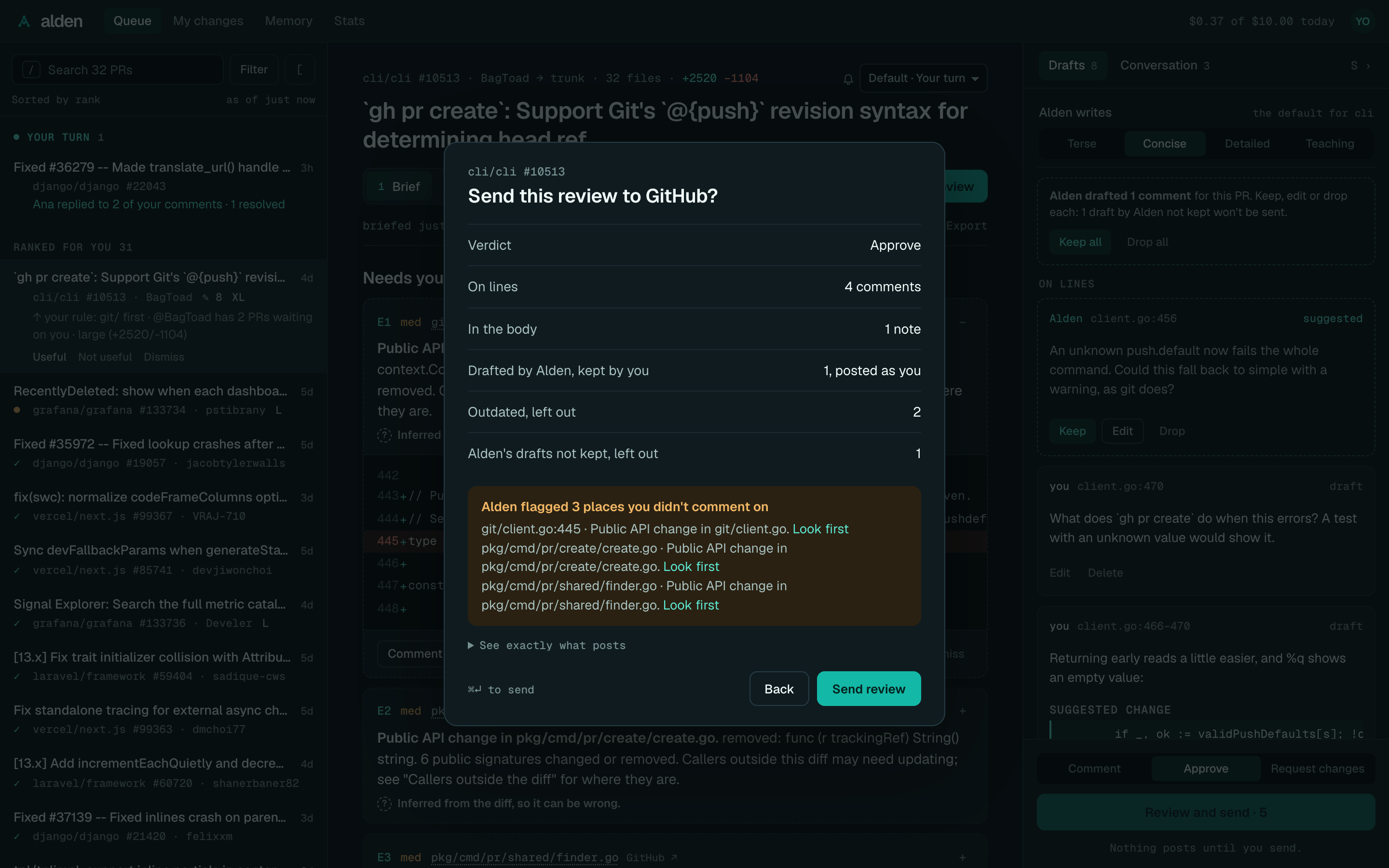
Pick the verdict: Comment, Approve, or Request changes (which needs a body). Then Review and send. Nothing posts yet: "Send this review to GitHub?" counts what will, the verdict, the comments on lines and what's in the body, the drafts Alden wrote that you kept ("1, posted as you"), replies and resolves, and what stays behind (outdated drafts, Alden's drafts you didn't keep). See exactly what posts opens the text itself: the body (yours, then your general notes) and each comment with its file, line and suggestion. Only on Approve does it raise the places Alden flagged that you didn't comment on, each with Look first, which closes the summary and takes you to that place.
Only Send review in the summary (or ⌘↵ there) sends it; Back or Esc returns to your drafts. Afterwards
"✓ Sent to GitHub · See the review ↗" shows at the bottom of the window for a few seconds and, when Alden learned
something from it, the drawer says so in one line: "Alden learned: you care about callers flags (2 of 3)". If GitHub
refuses, the summary shows why and keeps your drafts.
My changes
My changes briefs your uncommitted changes (staged, unstaged and untracked) in the clone alden ui started in,
before you open a PR. It has the same toolbar, Diff tab and walk-through as a PR, without comments.
Memory
Memory lists each repo Alden knows about, then what you look for and what you skip there. Each item says where it came from and what it changes, with Edit (for notes), Forget and Undo. A note says how many reviews confirmed it ("confirmed 3×") and has Apply under app/api again for each place you stopped it. A learned item lists what it was learned from, newest first: "from your review of acme/shop#412, Oct 8", then "and 3 more". A switch pauses learning, and Tell Alden something adds a note ("Money is in cents, never floats"). See Learning and memory.
Stats
Stats shows a repo's time to first review and review cycle time, week by week, before and after you started using
Alden there (or a date you pick), over the last 90 days or another window. See
alden stats. Below it, Time to review: your own reviews sent with Alden, from this
machine, over the last 14, 30 or 90 days: median active time and median time from opening the briefing to sending,
with and without the model, and how many reviews each rests on. See Time to review.
Settings
Settings change your user config, like alden config set; a repo's .alden.toml still overrides them there.
- Model: the default model and effort.
- Spend caps: per briefing and per day. When a briefing would pass its cap, Alden doesn't ask the model and shows the checks.
- Briefings: how many places "Needs your eyes" shows, 1 to 10 (3 by default).
- API keys: where the Anthropic and the OpenAI key each come from, and a field that takes either kind (Alden
detects which), stored in the keychain like
alden auth model. Write-only: the page only learns where each key comes from. Remove drops a stored key. - Setup: Run setup again shows the first run's steps (sign in, a model, your queue). See First run.
- Your feedback: how often you found Alden's places useful, and Export redacted feedback.
- Learning: Learn from my reviews (on by default). Off, Alden stops noting which places you saw and learns only from Useful and Not useful. See Places you saw.
- Drafts: Draft comments for me (on by default,
drafts.auto: once you set up a model, its briefings draft with nothing more to switch on). Off, a model briefing drafts no comments. - Time to review: Time my reviews (on by default,
stats.reviewTime). Off, Alden records no review sessions. See Time to review. - Your queue on this machine: which organisations and repos the queue covers, and what to leave out. The queue says when it's narrowed.
- Ranking: see below.
- Usage stats: on or off. See Usage stats.
- Appearance: match the system, light or dark.
- Today, beside them: today's spend against your daily cap, by PR.
The desktop app adds Command line tool, While you're away and Notifications: see The desktop app.
Ranking
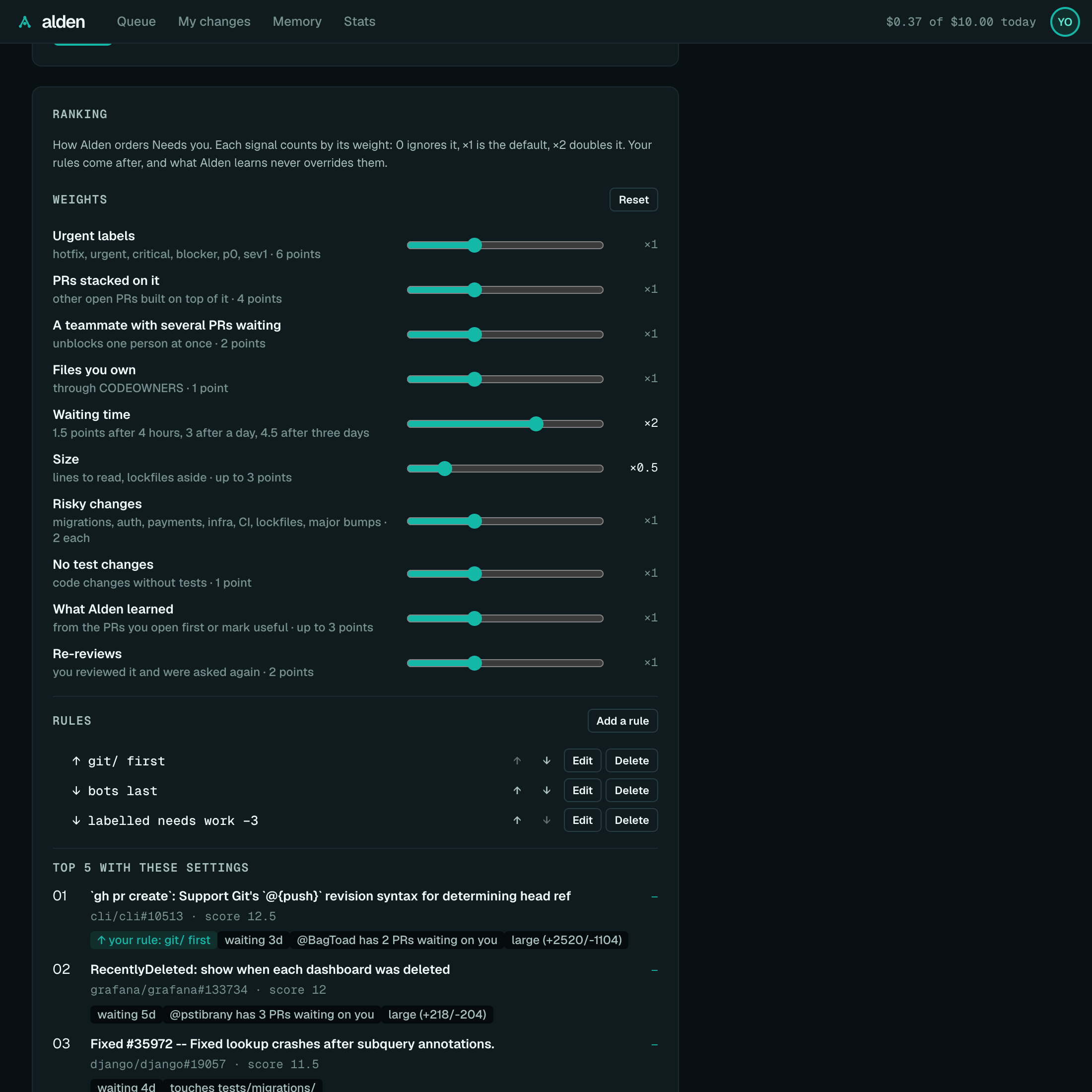
Ranking sets how the queue ranks:
- Weights: a slider per signal, from off (0) to ×3 here, ×1 by default, Re-reviews included. Reset puts them all back.
- Rules: add, edit, delete and reorder them. Each takes any of a path, label, author, repo, base branch and title, and puts PRs first or last, or boosts or lowers them. A rule's reason shows on the queue's rows, marked as yours ("↑ your rule: payments/ first").
- Top 5 with these settings: your current queue, re-ranked as you change things, with each PR's move against your saved settings. Without a queue to rank (signed out, offline), it says why.
Nothing applies until Save ranking; Discard changes goes back. In the desktop app, Ranking also sets how many top PRs to keep briefed in the background.
Keyboard
Keys never fire while you're typing in a text box.
| Key | Does |
|---|---|
j or ↓ |
Next PR, with its briefing |
k or ↑ |
Previous PR |
/ |
Search the queue (opens it first if it's folded). In the search, Enter opens the first match and Esc clears it |
[ |
Fold the queue to a rail, or bring it back (windows 960px and wider; in the Diff tab, [ is the previous place) |
r |
Refresh the queue |
o |
Open this PR on GitHub |
+ − x |
Useful, Not useful, Dismiss on this PR |
b |
Brief me on this PR |
e |
Open the Export menu (↑ ↓ move, ↵ picks, Esc closes) |
d |
Switch between the briefing and its diff (3 Diff) |
] [ |
In the Diff tab: next and previous place to look (E1, E2…) |
f |
In the Diff tab: open or close the file you're in |
g |
Walk through the places that need your eyes, or resume at the step you left |
n p |
Next and previous step of the walk-through |
s |
Open the Comments drawer, or fold it to its rail |
c |
Comment on the place you're on (a place in "Needs your eyes", an evidence line); elsewhere, open "Comment on a line…" |
⌘↵ / Ctrl+↵ |
Save the comment you're writing |
Esc |
Cancel the comment you're writing, or leave the send summary; go back from the walk-through to the brief; close the Comments drawer; stop a running briefing; in a narrow window, back to the queue |
Security
The UI's server can use your GitHub sign-in and spend your model budget, so it's locked down:
- It listens on 127.0.0.1 only, so other machines can't reach it.
- Every API call needs the session key in the link
alden uiprints. The key travels in the link's#fragment, which browsers never send to servers. The UI keeps it for that tab only and takes it out of the address bar. - Calls must come from the server's own address, which stops other websites, including through DNS rebinding.
- Pages get a strict Content Security Policy and don't send referrers.
Don't share the link while alden ui is running. A new run makes a new key. See Security model.
Working on the UI
See packages/ui/README.md. pnpm ui:demo serves the UI over the recorded public PRs,
with no GitHub or model calls, for UI work; pnpm screenshots takes the pictures on this page from it. Every route
of the local API is listed in Architecture. Colours, fonts and radii are CSS
custom properties listed, with what each is for, at the top of packages/ui/src/styles.css: dark is the v3 design's
palette, and light is derived from it.